 QuickPLS
What the method does
Compound necessity evaluates a condition expression, such as a conjunction or disjunction, as a necessary set for an outcome. Necessity asks whether outcome membership is contained in that condition expression. Coverage and relevance help distinguish an informative requirement from a condition that is almost universal.
Necessity consistency: Σᵢmin(Xᵢ,Yᵢ) / ΣᵢYᵢ.
X is the compound expression and Y the outcome. For AND, use the minimum of its component memberships; for OR, use the maximum. Define the expression before interpreting the ratio, and check a nonzero outcome denominator.
Data and analysis in QuickPLS
Use calibrated memberships and a substantively defined compound condition. Retain the original cases so apparently necessary combinations can be inspected.
QuickPLS calculates the compound-necessity expressions and fit measures. Inspect consistency, coverage and relevance together rather than selecting a combination on consistency alone.
Follow a worked example
The following example shows the data, settings and decisions for one analysis. Use the linked practice files to follow it. For your own study, keep the procedure and choose the variables, model and settings that fit your research question.
Download necessity.csv to begin. It contains 4 rows and 4 columns. The example below identifies the variables to use, their roles and any rows to exclude; not every column is an analysis variable.
State what you think the outcome needs
A necessity hypothesis asks whether the outcome can occur without a proposed requirement. The requirement may be one condition or a combination. For example, does delivery need capacity OR reach, or does it need both? This differs from asking whether a combination is enough to produce the outcome, or estimating the separate association of a predictor in regression.
For one case with A=.2 and B=.6, A OR B has membership .6, A AND B has membership .2 and NOT A has membership .8. OR takes the larger value, AND the smaller, and NOT uses the complement. Those calculations tell you the case's membership in each proposed requirement. Necessity still needs a comparison with the outcome across the included cases.
Save the memberships and name the hypotheses
Use the intended original memberships or saved calibration. Apply one missing-data rule across the selected source variables so the hypotheses use the same cases. Give each proposed expression a descriptive name and a reason for treating it as a possible requirement.
Build and calculate the expressions in QuickPLS
Load the saved setup
Open Compound necessity through the saved study or completed-result route. Select Owning study and Saved specification revision, then Load selected setup. Check the copied source sets and outcome direction.
Build each named expression
Choose Add named expression. Fill in Expression name and Expression rationale. Use Set operation to select Condition, AND, OR or NOT, and the Condition selectors to build the intended hypothesis. Check the displayed expression syntax.
Save and calculate
Give the revision a name, choose Save necessity revision, then Calculate necessity. The calculation uses that exact saved revision; this method does not need truth-table thresholds.
Inspect fit and original cases
Read necessity consistency, coverage and relevance together. Select the expression and inspect original cases to see where outcome membership exceeds the proposed requirement.
Keep exploration separate in the report
If you enable Optional bounded exploration, save its limits and check whether it completed. Select the actual named or exploratory expression for the dedicated report, preserving its status and case evidence.
Check whether a consistent requirement tells you anything useful
Necessity consistency asks how well outcome membership fits inside the proposed requirement. Coverage and relevance of necessity help judge how informative that requirement is. A set that includes almost every case can have high necessity consistency while telling you little about what distinguishes outcome cases. Inspect deviations, exclusions and any measure with an undefined denominator. Use the same included cases across expressions.
Keep a hypothesis chosen before analysis distinct from a candidate found by exploration. Manual expressions can use supported nested groups. The optional search covers pure AND or pure OR expressions with up to three distinct signed conditions, meaning a condition present or absent. It does not search every mixed, nested theory. Keep an early-stopping status visible. Also remember that fuzzy A OR NOT A is not always 1, and fuzzy A AND NOT A is not always 0.
Check the operations with A=.2 and B=.6: OR is .6, AND is .2 and NOT A is .8. Correct arithmetic for that case confirms what the expression means. It cannot establish necessity without the outcome values and the other cases.
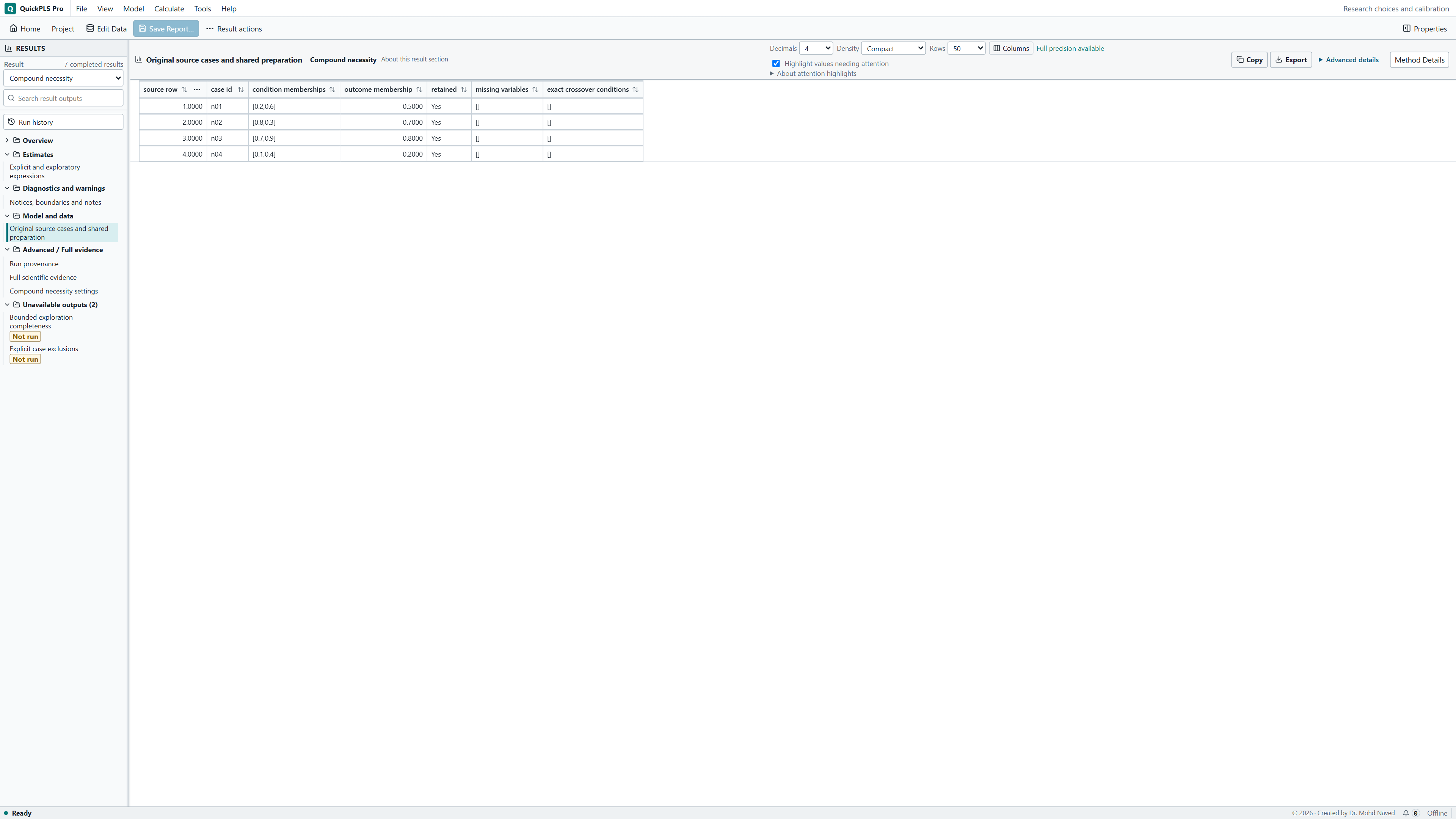
For this exercise the completed result should identify three separate expressions: A OR B, A AND B and NOT A. Inspect their memberships for n01 to n04. The OR expression contains Y for all four cases; the AND expression falls below Y throughout. Use these cases to explain the summary measures.
On a small screen, swipe the table sideways to see every column.
| Output | How to read it | What to check |
|---|---|---|
| Named expression and membership | Inspect the actual AND, OR and NOT expression on original cases. | For fuzzy sets, A OR NOT A is not generally 1 and A AND NOT A is not generally 0. |
| Consistency of necessity | Assess how well outcome membership is contained in the expression membership. | An expression that includes almost every case may tell you little about what distinguishes outcome cases. |
| Coverage and relevance of necessity | Read these alongside consistency to assess how informative the necessity claim is. | An undefined denominator remains undefined, rather than being replaced by zero. |
| Exploration status and case evidence | Separate hypotheses specified before analysis from expressions found during exploration. Inspect cases that support or contradict each expression. | A search stopped at its limit is incomplete. The best-fitting expression found during exploration is not automatically a confirmed hypothesis. |
Open the four-case necessity exercise
Use necessity.csv or a copy of Research choices and calibration. Compare the three saved hypotheses with the four original cases. Preserve the original files before editing a hypothesis.
Compare either resource, both resources and lack of one resource
Use necessity.csv to examine three proposed requirements for delivery: capacity OR reach, capacity AND reach, and NOT capacity. A and B are capacity and reach memberships; Y is delivery membership. These are invented teaching meanings. Each hypothesis would need its own substantive reason in real research.
The four complete cases have A, B, Y values n01 = 0.2, 0.6, 0.5; n02 = 0.8, 0.3, 0.7; n03 = 0.7, 0.9, 0.8; and n04 = 0.1, 0.4, 0.2. These are graded memberships rather than only fully in or out. Keep all four cases for this calculation, including Y = 0.5. An exact crossover value can be used in this necessity analysis.
Define the requirement before reading its fit
For each case, compare Y with membership in the proposed necessary expression. A OR B takes the maximum of A and B; A AND B takes their minimum; NOT A takes 1 minus A. The same underlying columns therefore produce three different candidate requirements.
The saved specification Three declared compound-necessity hypotheses contains these expressions. Explain why either resource might meet a requirement, why both might be needed together, or why absence of capacity would be relevant. A high fit value cannot provide the missing theoretical reason. It describes how the hypothesis you chose relates to these cases.
Build the hypotheses and inspect where they fail
Load the necessity study
Open the necessity.csv study in fsqca_research_choices.qpls. Open Compound necessity, choose the saved Three declared compound-necessity hypotheses revision and Load selected setup. Confirm A, B and Y and the intended outcome direction.
What you should see: The necessity study identifies the outcome and included cases.
How to read it: Confirm their membership definitions.
Build three separate expressions
Use Add named expression for each hypothesis. For A OR B, choose OR under Set operation and select A and B as its operands. Use AND for the second hypothesis. For NOT A, choose NOT and select A inside it. Give each expression a name and rationale and check the displayed syntax.
What you should see: Three distinct expressions are listed with the intended AND or OR operators.
How to read it: The operator changes the compound set.
Keep the included cases the same
Confirm that all four rows contain the selected memberships. Use the shared missing-data decision over the selected variables so each hypothesis is evaluated on the same observations.
What you should see: Every expression uses the same intended cases.
How to read it: Different denominators would complicate the comparison.
Save and run the declared hypotheses
Enter a New revision name and choose Save necessity revision. After the save completes, choose Calculate necessity. Select each completed expression and read its necessity consistency, coverage and relevance together. This calculation needs no truth-table frequency or sufficiency thresholds.
What you should see: The completed output names each declared expression and its fit measures.
How to read it: Read consistency with coverage and relevance.
Inspect original cases
Select each expression and use the original-case inspection. A positive-outcome case supports necessity when expression membership is at least Y. Find cases where Y is larger and inspect why the proposed requirement falls short.
What you should see: The case table shows whether outcome membership exceeds the proposed necessary set.
How to read it: Investigate those cases before making a necessity claim.
Work out the memberships and fit from the four rows
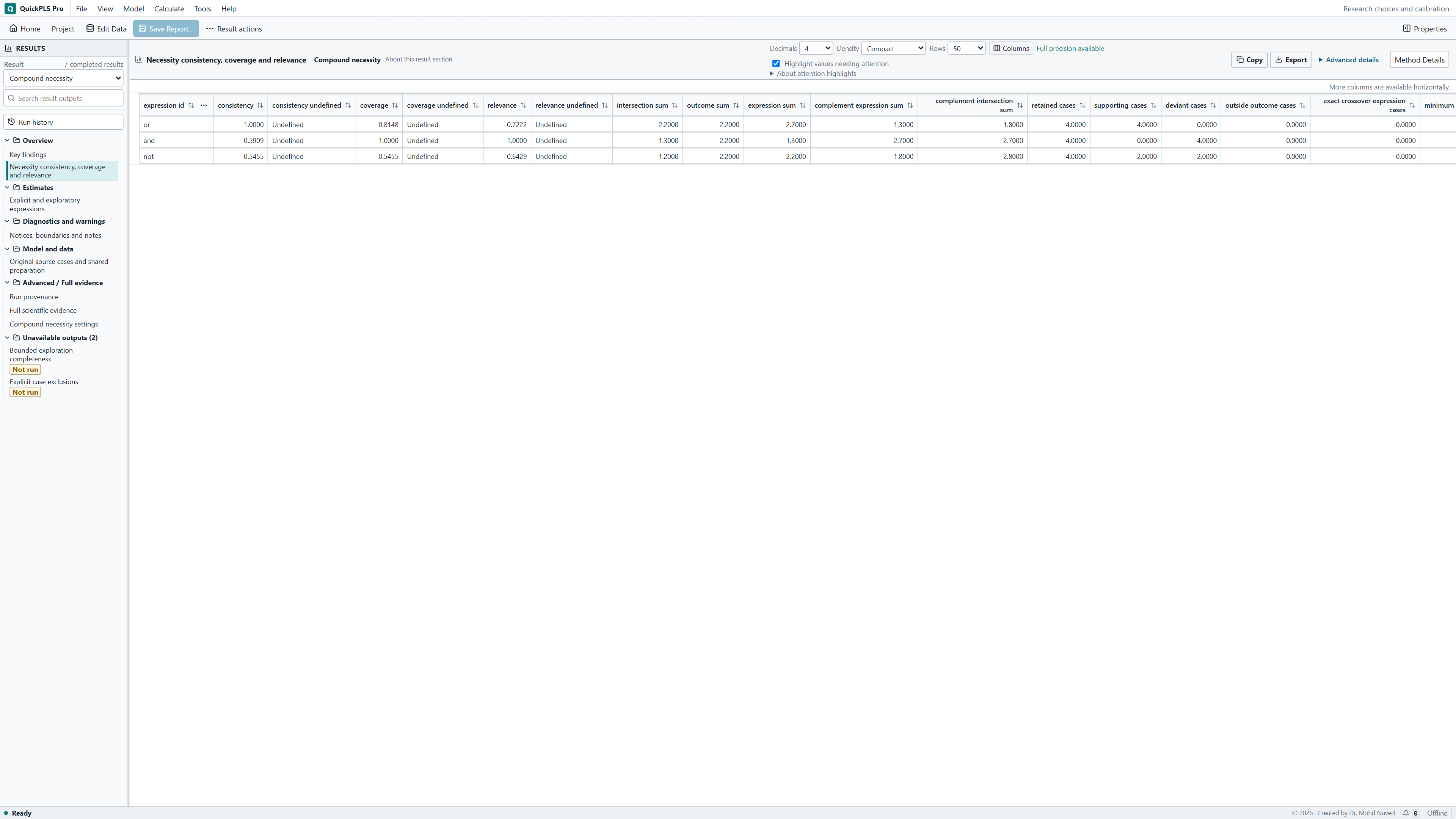
The Y memberships total 2.2. A OR B totals 2.7 and is at least as large as Y in every case. The intersection, found by taking the smaller of expression and outcome membership for each case, totals 2.2. Necessity consistency is 2.2/2.2 = 1; necessity coverage is 2.2/2.7 = 0.814815. These hand counts match the saved example.
A AND B totals 1.3 and falls below Y in every case. Its consistency is 1.3/2.2 = 0.590909, even though coverage is 1.3/1.3 = 1. That perfect coverage does not make it necessary. NOT A has intersection total 1.2 and expression total 2.2, so both consistency and coverage are 1.2/2.2 = 0.545455.
On a small screen, swipe the table sideways to see every column.
| Case | Y | A OR B | A AND B | NOT A |
|---|---|---|---|---|
| n01 | 0.5 | 0.6 | 0.2 | 0.8 |
| n02 | 0.7 | 0.8 | 0.3 | 0.2 |
| n03 | 0.8 | 0.9 | 0.7 | 0.3 |
| n04 | 0.2 | 0.4 | 0.1 | 0.9 |
Read relevance beside consistency and the deviant cases
The saved relevance of necessity, abbreviated RoN, is approximately 0.722222 for A OR B, 1 for A AND B and 0.642857 for NOT A. RoN helps judge whether a proposed requirement is informative rather than nearly universal. Read it alongside consistency and coverage. The AND expression's RoN of 1 does not repair its low necessity consistency, and four synthetic cases do not establish a causal requirement.
All four cases support the OR relation and all four deviate from the AND relation. For NOT A, n01 and n04 support necessity, while n02 and n03 do not. Inspect the latter cases when considering whether the hypothesis, set meaning or calibration needs rethinking. Do not select a requirement just because one summary column looks strongest.
Keep the fuzzy meaning of the expression
At n01, A is 0.2 and NOT A is 0.8. Thus A OR NOT A is max(0.2, 0.8) = 0.8, not 1. A AND NOT A is min(0.2, 0.8) = 0.2, not 0. Rules that simplify purely binary Boolean expressions cannot automatically replace these graded membership operations.
Keep the declared expression and inspect its memberships. If you change its grouping or conditions, save a new hypothesis or revision and explain why. A simpler-looking written formula can mean a different membership calculation, so do not assume the original fit carries over.
Use a bounded search as exploration
The manual route accepts up to 50 named expressions. Each supports 32 condition occurrences, 127 expression nodes and 16 nesting levels. An occurrence is one appearance of a condition or its absence; nodes and levels describe the expression's structure and depth. The analysis supports 12 conditions and 10,000 cases. Prefer a hypothesis you can explain clearly rather than adding complexity to reach these limits.
Optional exploration searches pure AND or OR expressions with up to three distinct conditions, each present or absent. Its ceilings are 4,096 candidates and 20 million case evaluations. Set Maximum literals, Maximum expressions and Maximum case evaluations before running. If the search stops at a bound, report that status. A discovered candidate remains exploratory; it is not a hypothesis specified before seeing the results.
Find the relationship behind a surprising summary value
Return to the expression's case memberships when consistency and coverage seem to disagree. If a measure cannot be calculated because its denominator is zero or undefined, keep it undefined. If a search is unfinished, inspect the limit it reached before interpreting the candidate list.
On a small screen, swipe the table sideways to see every column.
| Problem | Check | Action |
|---|---|---|
| Coverage is 1 but necessity is weak | Consistency and the case inequalities | Explain why the AND expression’s high coverage does not establish necessity. |
| Fit changes after simplifying an expression | Whether a binary-only identity was used | Retain the declared min, max and complement operations. |
| Hypotheses appear to use different samples | Selected columns and the shared missing-data decision | Use the same intended cases for each expression and report which cases they are. |
| Exploration stops early | Candidate and case-evaluation limits | Report the stopping status and narrow the scope only for a stated reason. |
| A complex expression is rejected | Repeated condition terms, nested groupings and unrecognised conditions | Clarify the hypothesis and shorten it where its meaning allows, or state distinct hypotheses separately. |
Report the hypotheses you tested, including weak ones
Name each declared hypothesis, its membership operations and the common included cases. Report consistency, coverage and relevance together. If you also explored candidates, identify them and the search completion status separately from these planned hypotheses.
On a small screen, swipe the table sideways to see every column.
| Expression | Necessity consistency | Necessity coverage | Saved RoN |
|---|---|---|---|
| A OR B | 1 | 0.814815 | 0.722222 |
| A AND B | 0.590909 | 1 | 1 |
| NOT A | 0.545455 | 0.545455 | 0.642857 |
Example Methods paragraph
We evaluated A OR B, A AND B and NOT A as declared necessity hypotheses on four synthetic fuzzy-set cases. Expressions used maximum, minimum and complement operations. We compared necessity consistency, coverage, relevance and case-level deviations on the same included cases.
Explain why perfect coverage does not establish necessity
You could report: A OR B contained outcome membership in all four teaching cases, with necessity consistency 1 and coverage 0.815. A AND B had consistency 0.591 despite coverage 1 because its membership was below Y throughout. NOT A had consistency and coverage 0.545. These results compare the declared hypotheses within the synthetic example.
Calculate the OR memberships and locate both deviant cases for NOT A. Use one case to explain why the AND expression's coverage does not make it a necessary requirement. Then state what knowledge of the research setting would be needed to defend either the OR or AND hypothesis.
- Explain why either resource or both together might be required.
- Show one comparison of outcome and expression membership for an original case.
- Label an exploratory candidate separately from a declared hypothesis.
- Keep the search limits and completion status with the exploratory output.
Choose manual hypotheses or a clearly labelled search
The manual editor supports nested expressions within its limits. Exploration covers pure AND or OR expressions with up to three conditions, each present or absent. It does not replace fuzzy A OR NOT A with 1. Keep the exact expression and membership operations you intended.