 QuickPLS
What the method does
Coincidence Analysis searches for minimally sufficient conditions and minimally necessary combinations that account for outcomes under the selected fit thresholds. Atomic formulas describe one outcome; compatible formulas can form more complex structures. Causal interpretation requires assumptions about relevant factors, timing and alternative structures, beyond a formula’s fit.
Example atomic formula: A·B + C ↔ Y.
The expression says that the disjunction of A AND B with C is treated as necessary and sufficient for Y under the analysis criteria. It is an illustrative form, not a result from the practice data. Competing formulas need separate evaluation.
Data and analysis in QuickPLS
Use supported crisp, categorical or fuzzy-set inputs with clear factor and outcome definitions. Set the search limits, fit thresholds and any ordering restrictions before examining candidates.
QuickPLS provides the CNA setup and separate solution formulas. Keep each candidate intact and inspect its fit and empirical coverage before comparing it with alternatives.
Follow a worked example
The following example shows the data, settings and decisions for one analysis. Use the linked practice files to follow it. For your own study, keep the procedure and choose the variables, model and settings that fit your research question.
Download crisp-outcomes.csv to begin. It contains 10 rows and 5 columns. The example below identifies the variables to use, their roles and any rows to exclude; not every column is an analysis variable.
Look for combinations that explain an outcome
Coincidence Analysis, or CNA, starts with factors such as readiness, support and delivery. It searches for combinations that meet your requirements for an outcome, then checks whether they can be simplified. It builds formulas for individual outcomes and may connect compatible formulas into a larger structure. Before searching, decide which factors may be outcomes, which directions are plausible and how much complexity the study can justify.
Choose the data mode that matches the measurements: crisp values mean in or out of a set; fuzzy memberships express degree of membership; multi-value categories name distinct states. CNA does not choose that meaning or turn arbitrary raw scores into memberships for you. Preview the prepared data. In the exercise, A and Y agree while B varies, making it easy to see why an extra condition may be unnecessary.
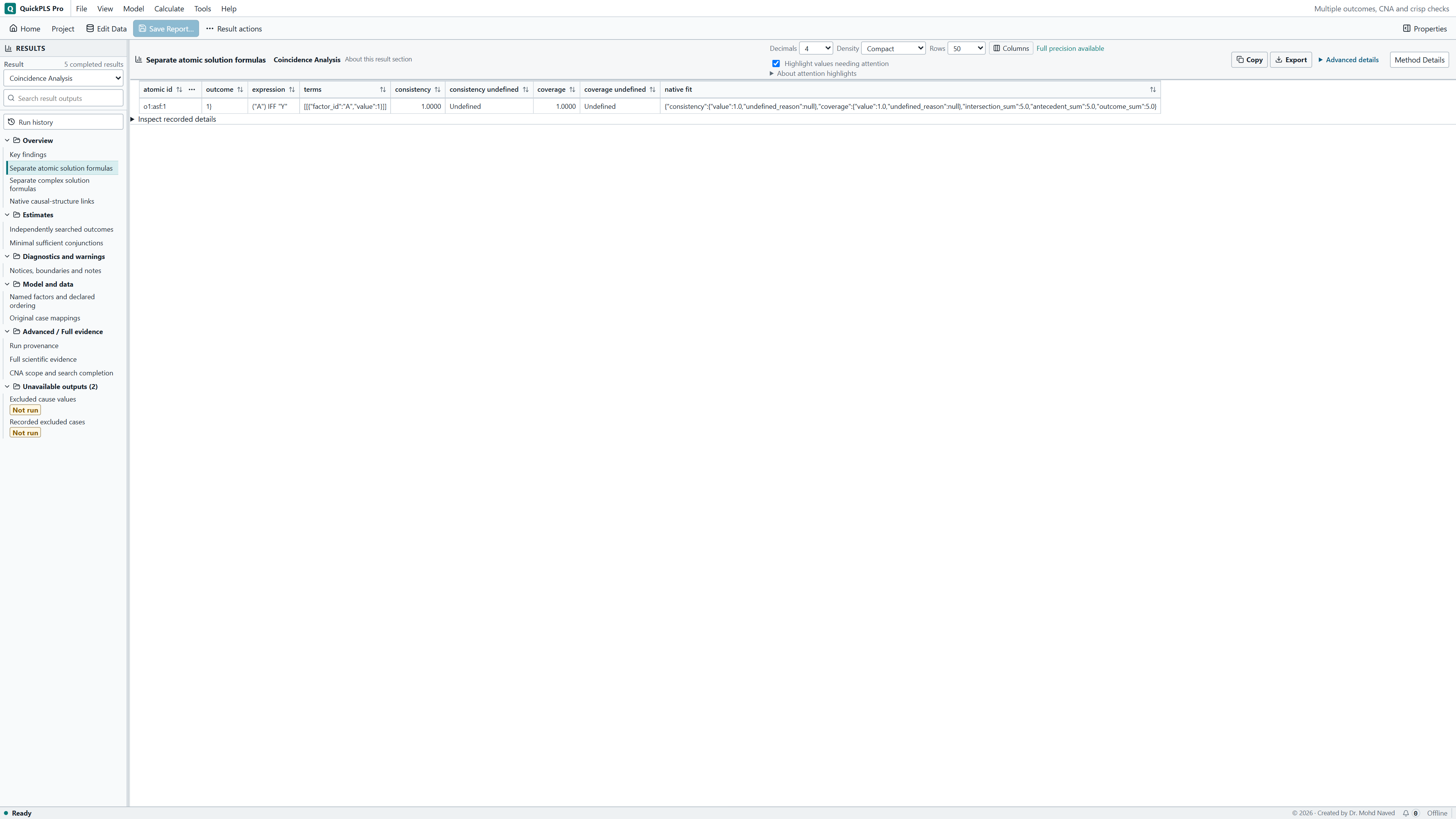
For this ten-case exercise, inspect the returned A IFF Y atomic formula and its b-case memberships. An (A AND B) IFF Y image would describe another question. Keep the formula, selected factors and source cases visible together when checking the result.
Choose the factors and permitted outcomes
Select the data mode, then choose 2 to 8 factors and 1 to 3 eligible outcome literals. A literal is one stated factor value, such as A present or A absent. Choose outcomes on distinct factors. Set causal tiers, meaning the order in which factors may act, and decide the search's complexity limits before calculating.
Prepare, calculate and investigate CNA
Open the workspace
Choose Data, More, Coincidence Analysis. Select the Owning study and saved revision, then use Load CNA setup when starting from a saved setup.
State the search question
Choose the Data mode, factors, Eligible outcomes and causal tiers. Set the fit thresholds and complexity limits that match your study.
Check the prepared cases
Click Preview CNA data preparation. Inspect the memberships or category mappings, included cases and outcome roles. Click Save CNA revision when the choices are ready.
Run and read the status
Click Calculate CNA. Check which stages completed and whether a resource limit stopped the search before interpreting the list of formulas.
Inspect a returned formula
Select an actual minimal conjunction, atomic formula or complex formula from the result. Open the supported case evidence for that selection and keep its matching report.
Follow the output from combinations to formulas
A sufficient conjunction joins conditions with AND. A minimal one cannot be shortened while still meeting the search rules. An atomic formula relates a candidate expression to one outcome; a complex formula connects compatible atomic formulas. The latter is a logical structure, not a regression diagram. Select a returned formula to inspect its cases. For a complex structure, follow the links to its supporting atomic formulas: there is no single case-membership score for the whole complex model.
Read the search status before saying a list is complete. A stopped search can retain useful formulas without examining every candidate allowed by your settings. Report the stopping reason and completed stages. Even a completed search is exhaustive only within its declared scope. A formula's minimality applies to those factors, cases and rules; it does not establish a unique causal explanation.
When presenting a complex structure, show the atomic formulas that support it and the limits used to search. If a stage was incomplete, say which part of the structure could still have other candidates. This lets the reader distinguish the returned evidence from a claim that all possible explanations were examined.
On a small screen, swipe the table sideways to see every column.
| Output | How to read it | What to check |
|---|---|---|
| Mode, factors and causal tiers | Read the explicitly selected crisp, existing-fuzzy or multi-value data mode and permitted outcome directions. | CNA does not infer its mode or calibrate raw scores automatically. |
| Minimal sufficient conjunctions | Inspect combinations that meet the consistency requirement and allowed conjunction size, and cannot be shortened under the search rules. Read coverage as a separate measure. | A strong candidate alone is not a complete explanatory model. |
| Atomic and complex formulas | Follow the links from each complex formula to the individual atomic formulas it combines. | Do not invent one case membership for an entire complex model or read diagram links as effect sizes. |
| Search completion and case evidence | Keep stopping reasons, completed stages and formula-specific cases in the interpretation. | If the search stopped early, further formulas may exist within the selected limits. |

Use the small example to recognise an unnecessary condition
Save a copy of Multiple outcomes, CNA and crisp checks, or use crisp-outcomes.csv. Its saved CNA example lets you follow a formula back to the cases it describes. Keep the original while changing the factors or search settings in your copy.
Check a simple relation before reading a larger structure
In crisp-outcomes.csv, select A, B and Y. Read A as readiness, B as additional support and Y as achieved delivery. The ten invented rows deliberately make Y equal A while B varies. You can therefore check the relation by hand before interpreting more complicated formulas.
The saved specification is Crisp CNA with explicit A/B before Y ordering. Its saved atomic result is A IFF Y. IFF means if and only if: cases with A have Y, and cases with Y have A in these data. The relation fits the constructed file exactly. It does not establish a causal finding about real organisations.
Choose the outcome and the permitted direction
Choose crisp mode, factors A, B and Y, and Y = 1 as the eligible outcome. Use case_id as the case label. Leave Z out: it was constructed as Y's complement, so adding it would change the search question rather than provide an independent measurement.
The saved setup puts A and B in an earlier causal tier than Y. It selects Require causes to precede outcomes in the declared tiers and Restrict complex formulas to acyclic structures. Acyclic means a chain of arrows cannot loop back to its starting factor. These choices restrict the directions the search may examine; they need support from the study design or subject knowledge and do not prove a causal direction.
Run the ten-case teaching search
Load the CNA setup
Open fsqca_multiple_outcomes_cna.qpls, select crisp-outcomes.csv and choose Data > More > Coincidence Analysis. Select the owning study and Crisp CNA with explicit A/B before Y ordering revision, then Load CNA setup.
What you should see: The intended CNA setup is loaded.
How to read it: Confirm the dataset and factor types before searching.
Check roles and ordering
Confirm Data mode = Crisp 0/1 memberships, factors A, B and Y, and Y = 1 under Eligible outcomes. Keep A and B before Y in the causal tiers. Check Require causes to precede outcomes in the declared tiers and Restrict complex formulas to acyclic structures. Leave Z outside this search.
What you should see: Factor roles and ordering restrictions match the causal question.
How to read it: Arbitrary ordering can exclude plausible structures.
Review fit and search limits
Use consistency 1 and coverage 1 for this constructed example. Match the saved limits: maximum literals 3, maximum terms 4 and maximum complexity 10; ceilings of 4,096 minimally sufficient conditions, 256 atomic formulas, 512 complex solutions and 20 million evaluations. Check these before running rather than using an unspecified default.
What you should see: Consistency, coverage and search limits are recorded.
How to read it: These choices define which candidates can be returned.
Preview the ten cases
Click Preview CNA data preparation. Confirm the ten included rows, their binary memberships and the selected outcome. Correct data or role mistakes before saving.
What you should see: The preview contains the ten intended cases.
How to read it: Resolve coding or inclusion errors before running.
Save and run
Click Save CNA revision, then Calculate CNA. Read the completion message and any reached limit. An empty formula list means little until you know what the search actually examined.
What you should see: The completed output distinguishes individual formulas and search status.
How to read it: An incomplete search cannot establish that no other candidate exists.
Investigate the relation
Select the returned atomic formula and open its case evidence. If viewing a complex formula, inspect the atomic relations behind its links rather than reading the arrows as effect sizes.
What you should see: The selected relation is linked to its cases and fit.
How to read it: Compare alternative formulas rather than treating the first as uniquely established.
Keep the result with its setup
Use Close CNA to return to the project. Keep the saved revision, result and data together so the selected factors, ordering and search limits remain available.
What you should see: The saved result remains linked to its setup.
How to read it: Report assumptions, alternatives and the search limits with the interpretation.
Count why A IFF Y fits these cases
Cases b01 to b05 have A = 1 and Y = 1; b06 to b10 have A = 0 and Y = 0. A membership sums to five, Y membership sums to five and their intersection also sums to five. Consistency is 5/5 = 1 and coverage is 5/5 = 1. These hand counts agree with the existing saved atomic result.
Now examine a more specific expression by hand. A AND B covers b02 and b04, with consistency 1 but coverage 2/5. A AND NOT B covers b01, b03 and b05, with consistency 1 and coverage 3/5. Together they cover all A cases and simplify back to A. These are direct case-count comparisons, not a claim that both longer expressions must appear as minimal returned candidates. B cannot be required for the complete relation because the other positive cases have B = 0.
On a small screen, swipe the table sideways to see every column.
| Candidate | Covered Y-positive cases | Consistency | Coverage |
|---|---|---|---|
| A | b01, b02, b03, b04, b05 | 1 | 1 |
| A AND B | b02, b04 | 1 | 2/5 |
| A AND NOT B | b01, b03, b05 | 1 | 3/5 |
Understand each level of the search
A literal names a factor state. A minimally sufficient condition, often called an MSC, is a combination that meets the selected sufficiency requirement and cannot lose a literal without failing the analysis rules. An atomic solution formula relates an allowed outcome to a sufficient expression while meeting the required coverage. A complex solution joins compatible atomic relations. Read each as a different stage of the search, not as interchangeable names for the final answer.
A IFF Y is enough to teach these distinctions here. Its perfect fit tells you how the selected memberships relate in the included cases. It does not estimate what would happen after an intervention, remove omitted factors, correct measurement error or settle selection bias. Explain the proposed ordering alongside the research design.
State how much the search was allowed to examine
The saved example allows maximum literals 3, maximum terms 4 and maximum complexity 10. A literal is a factor state, a term is an AND combination and complexity limits the formula's total detail. The resource ceilings are 4,096 minimally sufficient conditions, 256 atomic formulas, 512 complex solutions and 20 million evaluations. Record whether the search completed within these limits. A stopped search does not show that no further formula could qualify.
The supported setup accepts 2 to 8 factors, 1 to 3 eligible outcomes on distinct factors, up to 10,000 cases and 65,536 configurations. Multi-value factors can have 2 to 5 levels. This exercise uses crisp mode. The method definitions follow CNA 4.0.3; choose the mode and prepare the memberships explicitly in QuickPLS instead of assuming that another package's automatic selection or calibration options apply.
Investigate many formulas or weak fit through the study design
If many formulas qualify, review whether the selected factors, allowed directions and complexity limits answer the intended question. Read the cases that distinguish the alternatives. Lower fit thresholds may admit more candidates; tighter bounds may leave some qualifying structures outside the search. Make a change only for a stated research reason and save a new revision so the comparison remains clear.
In this file, adding B to A does not improve the exact relation with Y. Use the example to recognise unnecessary detail, not to declare B irrelevant in other populations. Different measurements, case selection or study settings could produce a different relation.
Find out whether the issue is preparation or search scope
First inspect the prepared factor values and eligible outcome. Next read the completion status and resource message. If those are correct, inspect the cases where a candidate expression and outcome disagree. This sequence separates a coding mistake from a deliberate scope restriction or a substantive exception worth discussing.
On a small screen, swipe the table sideways to see every column.
| Symptom | What to check | Action |
|---|---|---|
| Crisp preparation rejects a value | Whether every selected factor contains supported crisp values | Correct or explicitly prepare the intended memberships before CNA. |
| No formula appears | Fit requirements, ordering, bounds and completion status | Distinguish a completed empty search from a stopped or failed search. |
| A formula points in an unexpected direction | Eligible outcomes and ordering tiers | Review the declared research ordering and save a justified revision. |
| An AND formula is called equivalent despite low coverage | Its covered outcome membership | Distinguish sufficient conditions from the complete atomic relation. |
| A graph is described as regression effects | The atomic logical relations in the complex solution | Report the configurations and fit without inventing effect coefficients. |
| A screenshot shows a different formula | Whether it belongs to the same dataset | Select this lesson’s CSV and saved result, then match the displayed factors and formula before comparing numbers. |
Report the selected formula and the search behind it
Identify the factors, eligible outcomes, data mode, ordering and fit requirements. Give the complexity and resource limits, state whether the search completed, and name the actual returned formula you interpret. A graph alone cannot show those choices or the cases supporting its links.
| Item | Teaching example |
|---|---|
| Selected atomic relation | A IFF Y |
| Condition-expression, outcome and intersection sums | 5, 5, 5 |
| Consistency; coverage | 1; 1 |
| Numerical origin | Hand counts and existing saved CNA result |
| Search choices to report | Factors, eligible outcomes, ordering, bounds and completion status |
Example Methods paragraph
We analysed ten synthetic crisp-set cases with factors A, B and Y, selecting Y = 1 as the eligible outcome. A and B were ordered before Y, with strict ordering and acyclicity. Consistency and coverage requirements were both 1. We checked whether the search completed within its stated limits and inspected the cases supporting the selected atomic formula.
Explain why the shorter relation is enough here
A suitable Results account would say that the saved analysis returned A IFF Y with consistency and coverage of 1. Adding B would keep consistency 1 but cover only two of the five positive cases. A therefore describes the constructed outcome without that additional requirement. Keep this claim tied to the synthetic cases and the stated search choices and limits.
- Use the CSV to reproduce the five-case intersection of A and Y.
- Identify the positive cases missed by A AND B and explain its lower coverage.
- Point to the chosen outcome and explain the ordering restrictions.
- Distinguish completion within the stated limits from an interrupted search.
- Report an actual selected formula and its cases instead of combining pieces from different outputs.
Read the structure as logical relations
Prepare the memberships and select the mode before running CNA. An arrow in its structure shows a relationship expressed by the supporting formula; it has no regression coefficient or intervention-effect size. Inspect cases for a supported individual formula rather than assigning membership to the whole complex structure.